
Interaction with SAPIENT UI
Learn about the main UI elements and components in the SAPIENT application and how to navigate through different interfaces effectively.
This section of the user guide explains the general UI elements that are available in SAPIENT and are involved in executing the workflows. This helps you orient yourself within different user interfaces (UIs).
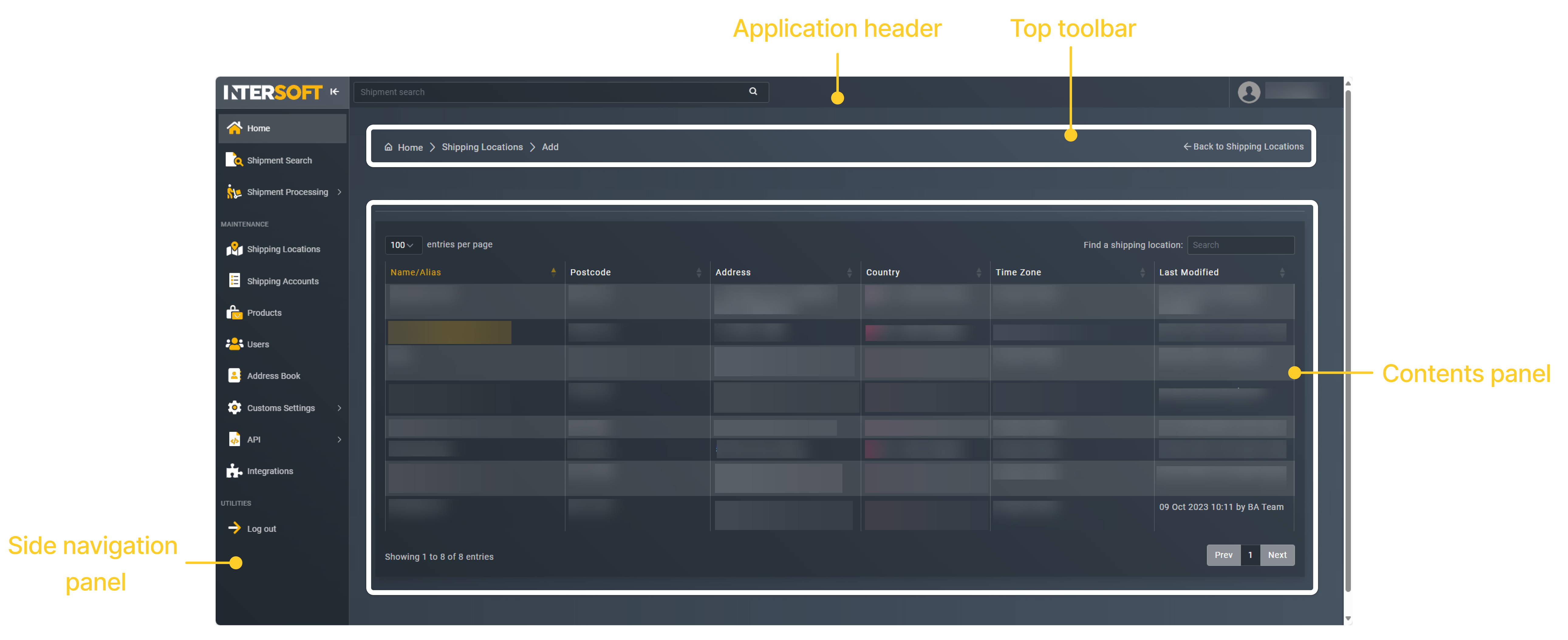
Main UI components
The SAPIENT application consists of four main blocks, each serving a specific purpose in your workflow. Each of the components work together to provide a comprehensive and user-friendly interface that supports your daily operations within SAPIENT.
Click any of the following cards to learn more about specific UI elements and their functionalities:
Application Header
The top-level navigation and branding area that provides access to global application functions and user settings.
Top Toolbar
Contains frequently used tools and actions specific to your current workspace, enabling quick access to common operations.
Side Navigation Panel
Your primary navigation hub for accessing different modules, features, and sections within the SAPIENT application.
Contents Panel
The main working area where you can view and interact with your data, reports, and primary application content.
Updated 20 days ago