
Create shipments with Allocate action
Allocate refers to an action that assigns resources (like items from inventory) to the shipment for fulfilment. This action ensures that the items intended for shipment are set aside and ready to be despatched.
Perfect for packages that are already sorted and only need labels printed after shipment creation.
Enables printing labels only when required in your warehouse process, optimizing workflow efficiency.
How Allocate action works
If your packages are pre-sorted and need labels to be printed after the shipments have been created, using the Allocate action in your Create Shipment request enables you to print labels only when they are required in your warehouse process, and only shipments that you have printed the labels for will be ready to be manifested.
If no value is set for this action in the Create Shipment request, then the shipments are created with the Process status.
Workflow process
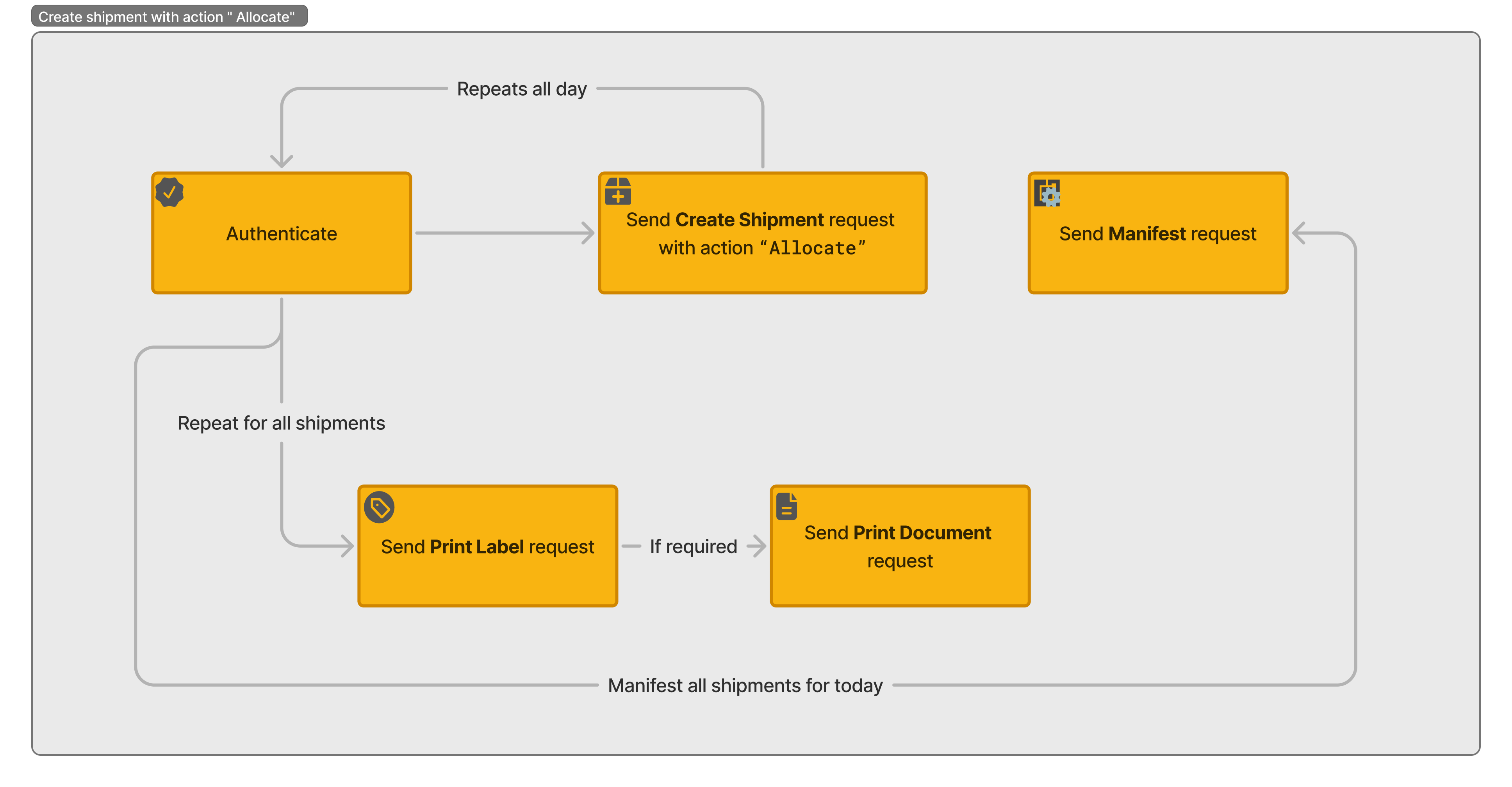
Workflow for creating shipments with Allocate action
API recipe
To view a step-by-step guide on how to process the shipments that are created with the action "Allocate," refer to the following API recipe:
See also
Finalise the shipment creation and prepares the shipment for transportation. This action generates a label in the Create Shipment response and the shipment is ready for manifesting immediately.
Initiate a new shipment entry in the system and capture all necessary details to generate shipping documents. This action does not return labels immediately - requires Print Shipment API call.
Updated about 2 months ago